Configuration changes not applying
Self-host Runtime- Ensure the
cyrusprocess is running locally - Restart if necessary
- Changes apply immediately
- Refresh the dashboard to confirm
Cloudflare tunnel timed out
If you see “Timeout waiting for Cloudflare tunnel”, there is a networking configuration issue on your server preventing the Cyrus cloudflare tunnel from connecting. Navigate to this Cloudflare networking documentation page to troubleshoot.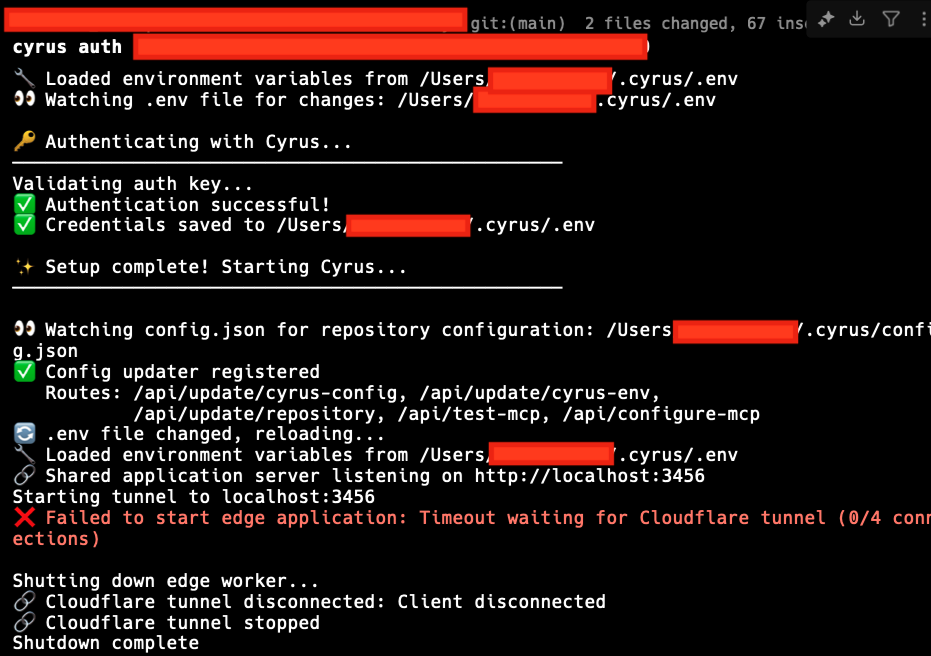
Repository not processing issues
Check the following:- Repository is marked Active
- Issue belongs to a selected Linear team
- Required routing labels are present
- Cyrus is assigned to the issue
- Integrations are connected
API key problems
If Cyrus fails to start work:- Confirm your Claude API key is valid
- Ensure sufficient credits
- Verify the key hasn’t been rotated or revoked
Still stuck?
We’re happy to help.- Discord: https://discord.com/invite/prrtADHYTt
- Email: Priority support for Pro & Team plans
- GitHub: https://github.com/ceedaragents/cyrus
If troubleshooting reveals a pattern, let us know — it helps improve Cyrus for everyone.

Cyrus Community
Get real time support on Discord