


Grok triggers and the routines-to-triggers vibe shift

Every couple of weeks, AI X latches onto a workflow phrase and turns it into the pattern of the moment. This week it is moving routines to triggers.
The line making the rounds started with Grok Bot engineer Lauren Tan (@poteto). After her November 18 breakdown on automating anything with Grok Bot crossed three million views, clip accounts distilled the takeaway into one sentence people kept bookmarking all week: "I moved my routines to triggers, now my bots only wake up when something actually happens."
Here is the funny part: webhook-triggered routines in Grok Bot did not launch this week. They shipped back in August. What changed in late November was pain. People running ten or twenty bots on hourly timers kept hitting their weekly Grok Bot usage limit halfway through the week, and r/GrokBot spent a month trading the same workaround—calling webhooks a "doorbell" instead of an alarm clock. Lauren's guide and the clips that followed finally gave that fix a name everyone could repeat.
What a Grok trigger actually is
In plain terms, a Grok trigger is the rule that tells a Grok Bot routine when to wake up.
When people first set up bots, almost everyone picks the obvious default: put the routine on a schedule. Check Linear every hour. Scan Slack every fifteen minutes. Peek at email all afternoon. That feels tidy until you notice your bot is waking up dozens of times a day just to discover nothing changed.
Switching routines to triggers flips the loop. Instead of waking on a clock to go look for work, the bot stays asleep until an event actually arrives. According to the official Grok Bot skills, routines, and automations docs, routines support six main trigger paths—alongside incident tools like Sentry and PagerDuty:
- Schedule — runs on a fixed timer. Still the right fit for time-bound work like a morning digest or a Friday summary, and the wrong fit for watching live queues.
- Webhook — lets any external app, script, or router trigger a Grok Bot routine on demand. You ask the bot to add a webhook trigger, then open the routine on desktop to copy its endpoint URL and key. Any sender that passes that key as a bearer token can wake the routine the instant something happens.
- Slack — starts a routine when matching activity lands in a channel. The docs explicitly warn against broad "every new message" listeners, which can burn through a week of usage in a day.
- GitHub — reacts directly to repository activity such as new issues, pull requests, and reviews.
- Email — kicks off a routine whenever a message arrives at the bot's dedicated email address.
- Linear — wakes a routine when issues or project updates land, instead of polling the tracker on an hourly loop.
Why the shift matters: usage limits, latency, and quiet bots
Trends on X usually blow over in forty-eight hours. This one stuck because moving from schedules to event triggers fixes three problems you feel right away.
First, your Grok Bot usage limit stops evaporating on empty checks. Look through recent r/GrokBot threads about cutting weekly usage in half and the story repeats over and over: a dozen scheduled routines ticking every fifteen or sixty minutes across quiet repos and inboxes. On November 26, Grok Bot engineer Sam Sokolin announced 11% more usage on every plan and up to 50% more usage for routines by skipping model calls on simple repetitive steps. Extra headroom helps, yet empty timer checks still spend quota on nothing. A trigger that never fires costs zero.
Second, latency drops from an hour to seconds. When a customer emails about a broken flow, a deployment fails, or a teammate requests changes on a pull request, waiting up to fifty-nine minutes for the next hourly sweep feels glacial. An event trigger wakes the bot the moment the change occurs.
Third, bots only speak when there is real signal. Nobody enjoys scrolling past twenty routine check-ins that all say "checked everything, nothing new." Event-driven bots stay quiet until something actually needs attention. If you want a step-by-step audit checklist for spotting which scheduled routines across Claude Code, Cursor, and Grok Bot should switch to triggers, see our guide to replacing scheduled agent checks with event triggers.
From one triggered bot to a context router
Moving one personal bot from a schedule to a Grok Bot webhook is a clean weekend win. The bigger bottleneck shows up the week after, when an entire team tries to wire up the rest of its stack. Real companies do not have one app pinging one bot. They have repositories, issue trackers, chat channels, customer emails, deployment pipelines, incident responders, booking calendars, and finance tools firing events all day—and different agents need the right slice of context without drowning in noise.
Connecting every upstream tool directly to every bot routine creates a tangle of one-off webhooks fast. Some services send sprawling, unfiltered payloads. Others have no clean way to route by customer, person, or project. Before long, half your operational overhead is chasing down stale secrets and figuring out which unverified endpoint just fired an unattended agent.
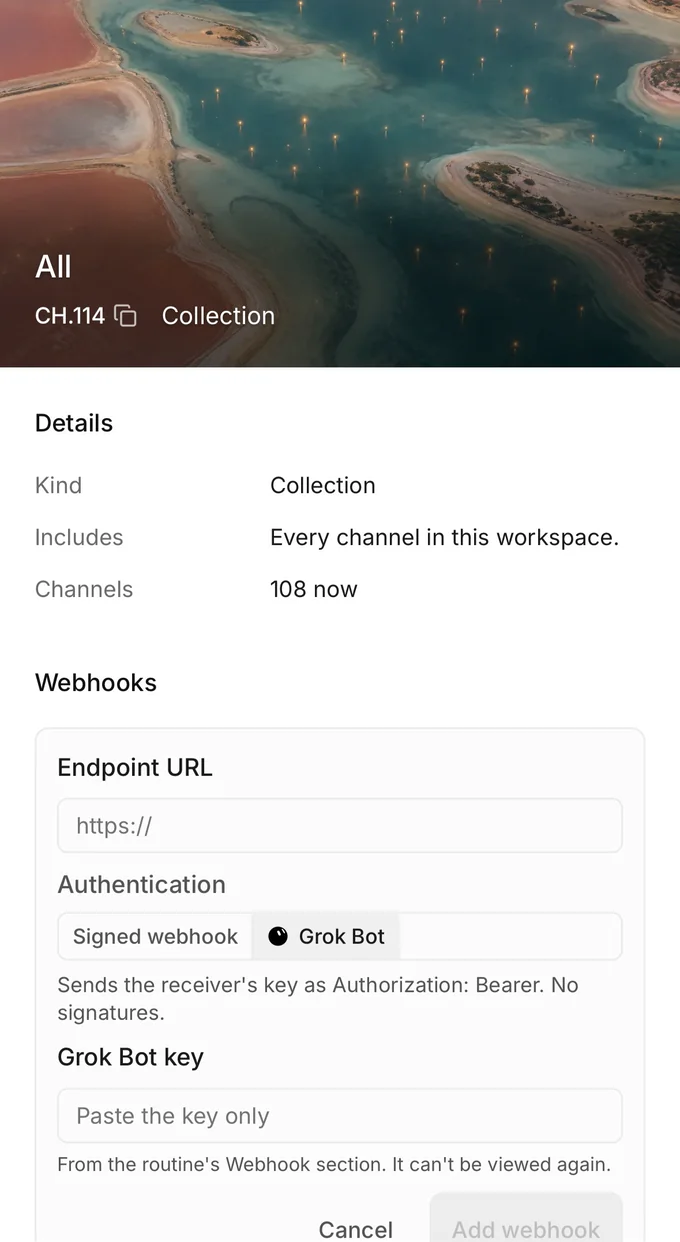
That is where Cyrus comes in. We built Cyrus as a context router—a switchboard with guardrails and low latency sitting between your tools and your agents, so teams move at the speed of data. When an event arrives, Cyrus verifies its signature and workspace permissions at the door, strips out raw credentials and unverified clutter, and maps the activity to the right Channel—a customer, organization, person, or project—as well as automatic Collections like All, which gathers every channel in the workspace.
From that switchboard, Cyrus routes real-time events from GitHub, Linear, Slack, Discord, Telegram, Email, and more straight into coding agents—and as the screenshot shows, you can also attach a Grok Bot webhook directly to any channel or the workspace-wide All collection. Drop in the routine's endpoint URL, switch authentication to Grok Bot, and paste the routine's key once. Every verified event flowing across your workspace funnels through one switchboard and wakes your Grok Bot routine on demand, with zero per-tool webhook plumbing. For the open standard emerging underneath this layer, read What are MCP Events?.
Ten new integrations shipped today—and the list is growing fast
A switchboard is only as useful as the tools plugged into it. Today, November 28, 2026, we shipped ten new inbound integrations in Cyrus, each with verified event handling and direct Channel routing:
- Cal.com — booking creations, reschedules, and cancellations
- Float Financial — card spending, bill, and reimbursement updates
- incident.io — incidents, alerts, escalations, and on-call activity
- Mixpanel — selected real-time product events
- Notion — activity on shared workspace content
- Sentry — issue activity from connected Sentry organizations
- Vanta — Trust Center access requests and vendor decisions
- Vercel — deployments and their outcomes
- Wise Business — transfer updates from connected business profiles
- X — new posts from watched public accounts, plus personal X account linking
These ten join the workspace connections teams already route through Cyrus—GitHub, Linear, Slack, GitLab, Jira, Resend for email, and Granola for meeting notes—alongside live chat channels like Discord and Telegram. And this catalog is expanding fast. The goal is simple: whenever something meaningful changes anywhere in your stack, the right context reaches the right agent in seconds without anyone building brittle glue or burning quota on hourly loops.
The routines-to-triggers wave on X is one of those rare viral AI phrases that actually points at a durable architectural shift. First you stop paying bots to check empty rooms on a clock. Next you put a guarded context router in front of them so every event—a failed Vercel deploy, a Sentry spike, a Vanta Trust Center request, or a Linear escalation—wakes the right agent immediately.
Frequently asked questions
What is a Grok trigger?
A Grok trigger is the condition or event that starts a Grok Bot routine automatically. Rather than running on a repeating clock, an event trigger keeps the bot asleep until something specific happens—such as an incoming webhook request, an email, a Linear change, a GitHub update, or a matching Slack message.
What trigger types does Grok Bot support?
Per the official Grok Bot documentation, routines can run on a schedule or react to events from webhooks, Slack, GitHub, Linear, email sent to the bot's address, Sentry, and PagerDuty.
How do you trigger a Grok Bot routine with a webhook?
Ask Grok Bot to add a webhook trigger to your routine, then open the routine details on desktop to find its Webhook section. Copy the endpoint URL and the routine's key, and configure your sending app—or a context router like Cyrus—to pass that key as a bearer authorization header whenever an event should wake the routine.
Why does moving routines to triggers help with Grok Bot usage limits?
Scheduled routines consume usage on every tick even when nothing changed upstream. Moving reactive checks from hourly or 15-minute schedules to webhooks or native event triggers eliminates idle runs, and keeping Slack or webhook filters narrow prevents noisy channels from creating the same drain.
How does Cyrus connect to Grok Bot webhooks and other tools?
Cyrus works as a context router across your workspace. It verifies incoming events from GitHub, Linear, Slack, Email, and ten newly added integrations—Cal.com, Float Financial, incident.io, Mixpanel, Notion, Sentry, Vanta, Vercel, Wise Business, and X—organizes them into Channels and Collections, and routes them either straight into coding agents or out through a single Grok Bot webhook.

Break free from the terminal
As your Claude Code powered Linear agent, Cyrus is capable of accomplishing whatever large or small issues you throw at it. Get PMs, designers and the CEO shipping product.