


What is MCP Tool Search? The Claude Code feature that fixes context pollution

Developer Scott Spence documented starting a Claude Code session and watching 66,000 tokens disappear before typing anything. With Claude Sonnet 4.5's 200K token limit, that's a third of your working memory consumed by MCP tool definitions sitting unused in your context window.
This was context pollution, and it was killing MCP adoption.
This is great - context pollution is why I rarely used MCP, now that it's solved there's no reason not to hook up dozens or even hundreds of MCPs to Claude Code
— Simon Willison (@simonw) January 14, 2026
Enter MCP Tool Search - Anthropic's solution that just shipped to all Claude Code users. Instead of loading every tool definition upfront, Claude now discovers tools on-demand. According to Anthropic's engineering team, this reduces token overhead by 85%.
Here's everything you need to know about the feature that finally makes large MCP setups practical.
The problem: context pollution at scale
Let's be specific about what developers were experiencing.
The token tax
Every MCP server you connect brings tool definitions - descriptions, parameters, schemas. Helpful for Claude to understand what's available, but expensive in tokens.
Sam McLeod documented the costs in his analysis of MCP context pollution:
| MCP Server | Tools | Token Cost |
|---|---|---|
| GitHub | 91 | ~46,000 |
| Playwright | 21 | ~9,700 |
| AWS Cost Explorer | 7 | ~9,100 |
| AWS Terraform | 7 | ~6,400 |
GitHub's MCP server alone consumes nearly a quarter of Claude Sonnet's context window - before you've written a line of code.
Scott Spence found that with all his MCP tools enabled, he was hitting 143K of 200K tokens (72% usage) with MCP tools consuming 82K tokens (41% of total). That left just 12K tokens (5.8%) of free space.
One GitHub issue reported a user hitting 144,802 tokens from MCP tools alone - with MCP_DOCKER consuming 125,964 tokens across 135 tools.
The accuracy problem
More tools meant worse performance. With too many options, LLMs struggle:
- Tool selection degrades - Claude picks the wrong tool more often
- Parameter hallucination increases - Incorrect arguments get passed
- Attention disperses - Less focus on the actual task
- Latency grows - More tokens to process means slower responses
The irony: the more powerful you made your MCP setup, the less reliable Claude became.
The workarounds
Developers got creative:
- Manual server management - Editing
.claude.jsonto enable only what's needed - Tool consolidation - Scott Spence reduced mcp-omnisearch from 20 tools (14,214 tokens) to 8 tools (5,663 tokens) by combining similar functionality
- Scoped MCP servers - Building narrow-purpose servers instead of comprehensive ones
- Toolset flags - GitHub's MCP Server added
--toolsetsto enable only needed capabilities
All valid strategies. All tedious. All unnecessary now.
What is MCP Tool Search?
MCP Tool Search is a Claude Code capability that enables dynamic tool discovery. Instead of loading all tool definitions into context upfront, Claude searches for and loads only the tools it needs.
Anthropic's Thariq Shihipar announced the feature on January 14, 2026:
"Today we're rolling out MCP Tool Search for Claude Code. As MCP has grown to become a more popular protocol and agents have become more capable, we've found that MCP servers may have up to 50+ tools and take up a large amount of context. Tool Search allows Claude Code to dynamically load tools into context when MCP tools would otherwise take up a lot of context."
How it works
According to Anthropic's engineering documentation, the mechanism works like this:
- Detection: Claude Code checks if MCP tool descriptions exceed 10K tokens
- Deferral: If the threshold is exceeded, tools are marked with
defer_loading: true - Search tool injection: Claude receives a Tool Search tool instead of all the tool definitions
- On-demand discovery: When Claude needs a tool, it searches using keywords
- Selective loading: 3-5 relevant tools (~3K tokens) get loaded per query
Think of it like lazy loading for tools. Claude doesn't need to see every tool definition to know they exist - it just needs a way to find them when needed.
Two search methods
Anthropic provides two search algorithms:
Regex mode - Claude constructs regex patterns like "weather" or "get_.*_data" for precise matching when it knows roughly what it's looking for.
BM25 mode - Natural language queries with semantic similarity matching, better for exploratory searches.
Custom embeddings are also supported for teams with specific needs.
The numbers: what tool search actually delivers
Anthropic's engineering team published specific benchmarks:
Token efficiency
Traditional approach: ~77K tokens consumed before any work begins with 50+ MCP tools
With Tool Search: ~8.7K tokens, preserving 95% of context window
That's an 85% reduction in token overhead. The Tool Search tool itself adds only ~500 tokens of overhead.
Accuracy improvements
Anthropic's MCP evaluation suite shows significant gains:
| Model | Without Tool Search | With Tool Search |
|---|---|---|
| Opus 4 | 49% | 74% |
| Opus 4.5 | 79.5% | 88.1% |
Fewer tools in context means better tool selection accuracy.
When tool search kicks in
MCP Tool Search is now enabled by default for all users. You don't need to opt in.
According to Anthropic's documentation:
Under 10K tokens: Tool definitions load normally (no change from before)
Over 10K tokens: Tool Search activates automatically - tools are deferred and discovered on-demand
This means most users with simple setups won't notice any change. If you only have 1-2 MCP servers with a handful of tools, everything works as before.
The magic happens when you scale up. Add GitHub's 91-tool MCP, connect multiple integrations - now Tool Search saves you.
Checking your status
Run /context in Claude Code to see exactly where your tokens are going:
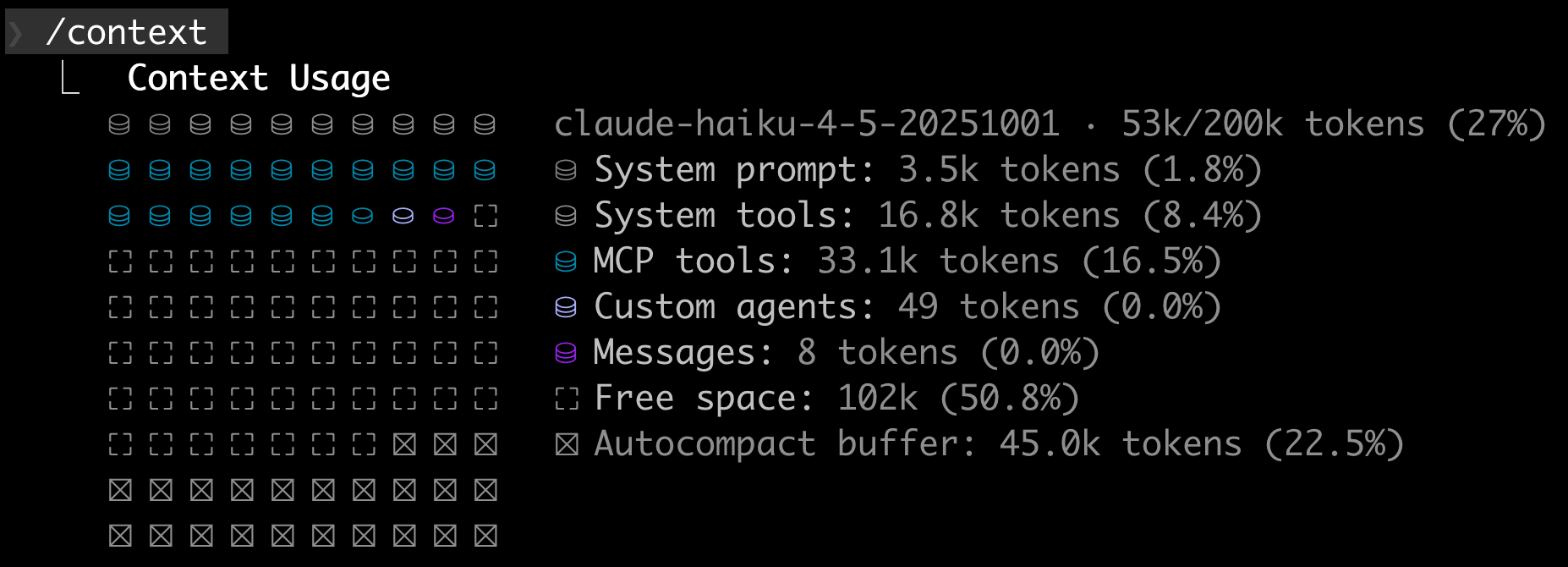
Or run /doctor for a detailed breakdown of MCP server token usage. Before Tool Search, you might have seen warnings like this:
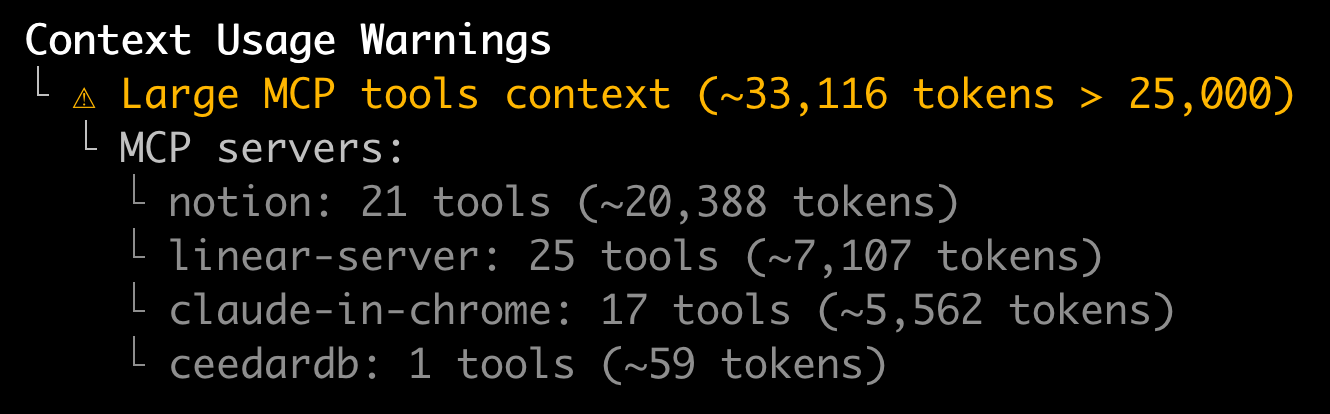
With Tool Search enabled, expect dramatically lower numbers as tools load on-demand.
Best practices for users
Even with Tool Search, you can optimize your setup:
Keep frequently-used tools non-deferred
If you use certain tools in almost every session, configure them to load upfront. Anthropic recommends this when all tools are used frequently per session.
Write good tool descriptions
Tool Search works by matching against names, descriptions, and parameter names. Better descriptions mean better discovery:
Weak: "Does stuff with data"
Strong: "Retrieves user profile data including name, email, and account settings from the database"
The more specific and keyword-rich your descriptions, the better Claude finds your tools.
Best practices for MCP server authors
If you're building MCP servers, Tool Search changes the optimization game:
Embrace larger tool libraries
Previously, MCP server authors were advised to keep tool counts low. Now you can offer comprehensive functionality without the context penalty.
Focus on discoverability
Sam McLeod recommends:
- Clear, searchable names:
github_create_issuenotcreate - Keyword-rich descriptions: Include terms users might search for
- Specific parameter names:
repository_urlnoturl - Grouped functionality: Consider combining related operations
When Tool Search helps less
According to Anthropic, Tool Search is less beneficial when:
- Fewer than 10 tools available
- All tools used frequently per session
- Tool definitions are already compact
The bigger picture
MCP Tool Search represents a fundamental shift in how AI agents interact with tools.
The old model: Load everything upfront, hope the context window holds
The new model: Discover on-demand, scale efficiently
Simon Willison's reaction captures it well - context pollution was the main reason many developers avoided MCP. With that solved, there's no reason not to connect dozens or even hundreds of MCP servers to Claude Code.
Getting started
If you're already using Claude Code with MCP servers, Tool Search is working for you automatically. Nothing to configure.
To verify it's active:
- Run
/doctorand check MCP token usage - Start a session with multiple MCP servers
- Notice the absence of "Context low" warnings
For MCP server authors: update your tool descriptions to be more discoverable, and don't be afraid to expand your tool offerings.
Using MCP servers with Cyrus? Starting with Cyrus v0.2.13, MCP Tool Search is enabled by default - we automatically optimize tool loading based on the task at hand. Just assign an issue and let us handle the complexity.

Break free from the terminal
As your Claude Code powered Linear agent, Cyrus is capable of accomplishing whatever large or small issues you throw at it. Get PMs, designers and the CEO shipping product.