


What is Claude Code's Code-Simplifier Agent? The official plugin for cleaner code

You're deep in a codebase when you spot it: a constructor that passes an object as a parameter to a callback... during its own construction. The code works - JavaScript closures make sure of that - but every new developer who reads it will spend 10 minutes figuring out why.
Code like this accumulates. Not bugs, but *confusion*. Patterns that technically work but make your codebase harder to understand, maintain, and extend.
What if you had an agent that could spot these patterns and clean them up? One that understands your project's conventions and refactors for clarity - automatically?
That's exactly what the code-simplifier agent does. It's the same tool the Claude Code team uses internally to keep their own codebase clean. Developers who've tried it are seeing 20-30% reductions in token usage and dramatically clearer code.
We just open sourced the code-simplifier agent we use on the Claude Code team. Try it: claude plugin install code-simplifier Or from within a session: /plugin marketplace update claude-plugins-official /plugin install code-simplifier Ask Claude to use the code simplifier
— Boris Cherny (@bcherny) January 9, 2026
What is Claude Code's code-simplifier agent?
The code-simplifier is an official Anthropic plugin - the same agent that the Claude Code team uses internally to keep their own codebase clean. It simplifies and refines code for clarity, consistency, and maintainability while preserving exact functionality.
Here's the key distinction: it never changes what your code does - only how it does it. All original features, outputs, and behaviors remain intact.
The agent runs on Opus and focuses on recently modified code by default. After a long coding session where Claude has been implementing features, you can run the code-simplifier to clean everything up in one pass.
How to install code-simplifier
Installing the code-simplifier takes about 30 seconds:
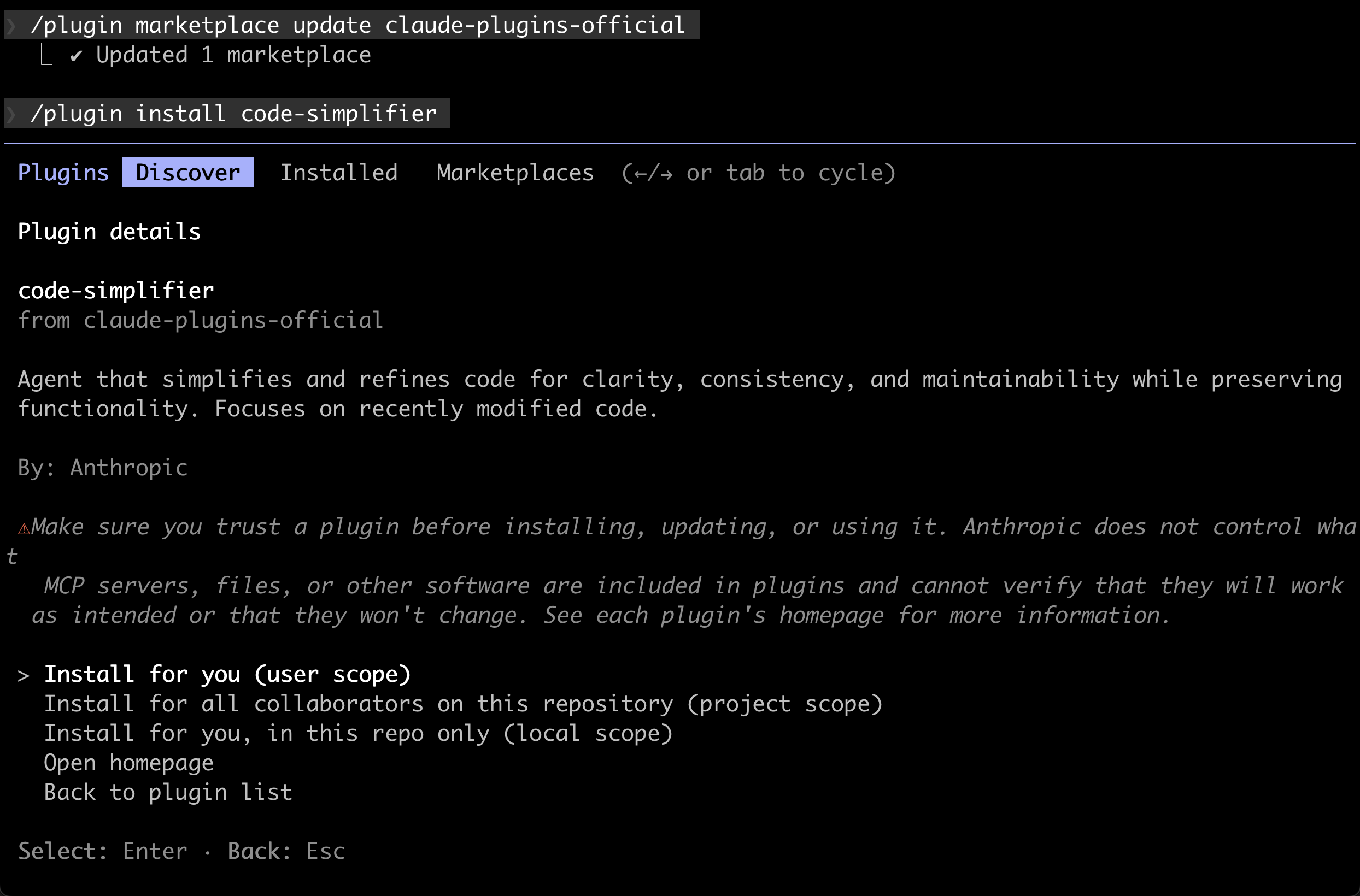
Option 1: Direct installation
claude plugin install code-simplifierOption 2: From within a Claude Code session
First, make sure you have the official Anthropic plugin marketplace:
/plugin marketplace update claude-plugins-officialThen install the plugin:
/plugin install code-simplifierImportant: After installation, restart your Claude Code session for the plugin to become active. The agent doesn't live-load, so you'll need to exit and start a new session before it appears in your available subagents.
What code-simplifier does
The agent analyzes your recently modified code and applies refinements in five key areas:
1. Preserve functionality
This is the cardinal rule. The simplifier never changes what your code does - only how it does it. If your function returns a specific value, handles certain edge cases, or produces particular side effects, all of that stays exactly the same.
2. Apply project standards
The agent reads your CLAUDE.md and follows your established patterns:
- ES modules with proper import sorting
- Consistent function syntax (prefers
functionkeyword over arrow functions for named functions) - Explicit return type annotations for top-level functions
- Proper React component patterns with explicit Props types
- Your project's naming conventions
3. Enhance clarity
This is where most of the magic happens:
- Reduces unnecessary complexity and nesting - Flatten deeply nested conditionals
- Eliminates redundant code and abstractions - Remove those three utility classes you didn't need
- Improves variable and function names - More descriptive, intuitive naming
- Consolidates related logic - Group things that belong together
- Removes unnecessary comments - Code should be self-documenting where possible
- Avoids nested ternary operators - Prefers switch statements or if/else chains
Critically, it chooses clarity over brevity. The goal isn't minimal lines of code - it's readable, maintainable code.
4. Maintain balance
The agent knows when to stop. It avoids:
- Over-simplification that reduces clarity
- Overly clever solutions that are hard to understand
- Combining too many concerns into single functions
- Removing helpful abstractions
- Prioritizing fewer lines over readability
5. Focus scope
By default, the agent only touches code that was recently modified in the current session. This prevents it from unexpectedly refactoring parts of your codebase you weren't working on.
Real example: code-simplifier in action
Here's what happened when we used code-simplifier on a real refactoring task. A developer was working on a GitHub issue about confusing code patterns in our AgentSessionManager:
// BEFORE: confusing - agentSessionManager passed as parameter during its own construction
const agentSessionManager = new AgentSessionManager(
    issueTracker,
    (childSessionId) => { ... },
    async (...) => {
        // This works due to JavaScript closure semantics, but it's confusing
        await this.handleResumeParentSession(..., agentSessionManager);
    },
    this.procedureAnalyzer,
    this.sharedApplicationServer,
);
After running the code-simplifier agent:
// AFTER: clear - construction is separate from callback configuration
const agentSessionManager = new AgentSessionManager(
    issueTracker,
    this.procedureAnalyzer,
    this.sharedApplicationServer,
);
agentSessionManager.setParentSessionCallbacks(
    (childSessionId) => { ... },
    async (...) => {
        await this.handleResumeParentSession(..., agentSessionManager);
    },
);
The code-simplifier:
- Identified the confusing pattern
- Introduced a setter method to decouple construction from configuration
- Removed the 8-line explanatory comment (no longer needed)
- Made the code read linearly: create → configure → use
The result? Same functionality, dramatically better readability. The refactor touched multiple files and all 257 tests continued passing.
When to use code-simplifier
After long coding sessions
This is the primary use case. After Claude has been implementing features for an hour, ask it to run the code-simplifier:
"Run the code-simplifier agent on the changes we made today"
Claude will analyze all recently modified files and clean them up in one pass.
Before creating pull requests
Run the simplifier before opening a PR to ensure your code meets quality standards:
"Use the code-simplifier to review and clean up these changes before we create the PR"
This catches over-engineering before it enters code review.
After complex refactors
When you've been making sweeping changes across multiple files, the simplifier can ensure consistency:
"Use code-simplifier to normalize the patterns in the files we just refactored"
For cleaning up AI-generated code
If you've been using Claude Code heavily and suspect there's accumulated complexity, the simplifier can audit and clean:
"Analyze the recent changes with code-simplifier and suggest improvements"
The token efficiency benefit
One underappreciated benefit: simplified code uses fewer tokens in future sessions.
When Claude reads your codebase to understand context, verbose code fills up the context window faster. By keeping code simple:
- Claude can read more of your codebase in the same token budget
- Subsequent sessions are cheaper
- Context windows stretch further
Japanese developer テツメモ (@tetumemo) reported 20-30% reductions in token consumption after regularly using the code-simplifier. That translates directly to lower API costs.
How code-simplifier compares to manual review
You might think: "Can't I just review code myself?"
You can. But here's what the code-simplifier does that humans often don't:
- Consistency - It applies the same standards everywhere, every time
- Speed - It analyzes thousands of lines in seconds
- No fatigue - It doesn't get tired after reviewing 20 files
- Objectivity - It doesn't have emotional attachment to clever solutions
- Knowledge of patterns - It knows dozens of simplification patterns instantly
The code-simplifier isn't replacing human code review - it's augmenting it. Run the simplifier first, then humans review the simplified code.
Framework-specific variants
The community has already created framework-specific versions:
Laravel/PHP: Taylor Otwell (Laravel's creator) ported the code-simplifier specifically for PHP:
/plugin marketplace add laravel/claude-code
/plugin install laravel-simplifier@laravel
This version understands Laravel conventions, PHP idioms, and framework-specific patterns.
Rust: There's a Rust-specific variant available through the MCP marketplace that handles Rust's ownership patterns and idiomatic code.
More framework-specific variants are being developed by the community.
Best practices
1. Run it regularly
Don't wait for code to become a mess. Run the simplifier after every significant coding session.
2. Review the changes
The simplifier is good, but not infallible. Always review what it changed before committing.
3. Set up your CLAUDE.md
The more guidance you give in CLAUDE.md about your coding standards, the better the simplifier can match your patterns.
4. Use with version control
Always run the simplifier in a git-tracked directory so you can review and revert changes if needed.
5. Combine with other workflows
The code-simplifier pairs well with:
- Plan mode (plan first, implement, then simplify)
- Code review agents
- Test runners (run tests after simplification to verify nothing broke)
The bigger picture
AI-generated code has a verbosity problem. It's not that Claude writes bad code - it's that it errs on the side of being thorough. That thoroughness creates maintenance burden.
The code-simplifier represents a shift in how we think about AI coding assistance. Instead of one-shot generation, we're moving toward iterative refinement: generate code, then clean it up with a specialized agent.
This pattern - specialized agents for specific tasks - is the future of AI-assisted development. You don't need one model that does everything perfectly. You need a team of agents, each excellent at their job, working together.
The code-simplifier is your cleanup specialist.

Break free from the terminal
As your Claude Code powered Linear agent, Cyrus is capable of accomplishing whatever large or small issues you throw at it. Get PMs, designers and the CEO shipping product.