


What is REA (Reverse Engineer Anything)? I ran it on Slack to find out
Last December I spent an evening pointing Claude Code at its own binary and running strings on it, mostly to see what was in there. Buried in it was a fully built tool called TeammateTool: thirteen operations for spawning and coordinating other agents, months before Anthropic shipped agent teams. I posted about it and people got pretty excited.
I guess that was reverse engineering, though at the time it didn't really feel like it. It felt more like being nosy with a good flashlight.
So when REA showed up on GitHub trending a couple of weeks ago, I mostly recognized it. Then it kept going. As I write this, morluto/rea has around 348k stars, a number I still don't quite know how to think about. Google Trends has "reverse engineer anything" up more than 5,000% month over month. Matthew Berman posted that software is done, Perplexity turned it into a /reverse-engineer skill inside Computer, and 404 Media called it the new wild west of AI.
Reverse Engineer Anything 😂
— Matthew Berman (@MatthewBerman) October 8, 2026
Software is done.
REA (Reverse Engineer Anything) by @morluto is now a skill in Computer.
— Computer (@AskPerplexity) October 16, 2026
The thread I keep coming back to is the one on r/claude asking whether anyone has actually tried it, because the claims sound kind of crazy. That's fair. So I tried it, in about the smallest way I could.
What REA actually is
REA is an MCP server and CLI, MIT-licensed, published on npm as rea-agents. You run npx rea-agents setup, pick your agents (Claude Code, Codex, Cursor, Gemini CLI and Grok Build are listed), approve the config changes, and restart. After that your agent can ask REA to inspect things it doesn't have source for.
REA mostly connects your agent to tools that already exist. It doesn't decompile anything by itself:
- Native binaries go to Ghidra, Hopper or IDA, which you install and license yourself
- JavaScript / Electron apps get static analysis (modules, IPC, preloads, native add-ons) without running the app
- Android goes through JADX and Apktool
- Websites go through a Chrome-family browser
- Plus .NET, WASM, EVM bytecode, firmware, packet captures and a pretty long tail of other formats
What makes it more than a bag of wrappers is the output format. Every finding comes back with evidence (file, byte range, hash) and, importantly, a list of what it couldn't figure out. More on that in a second.
One practical note: there are fake copies of the repo floating around. The README says to install only from morluto/rea, rea.tools, or the rea-agents npm package.
The tiny experiment: Slack
I picked Slack because it's open on my machine basically all day and it's an Electron app, so I could use the static JavaScript analyzer and skip installing Ghidra. I also wanted a question small enough that I'd know if the answer was wrong.
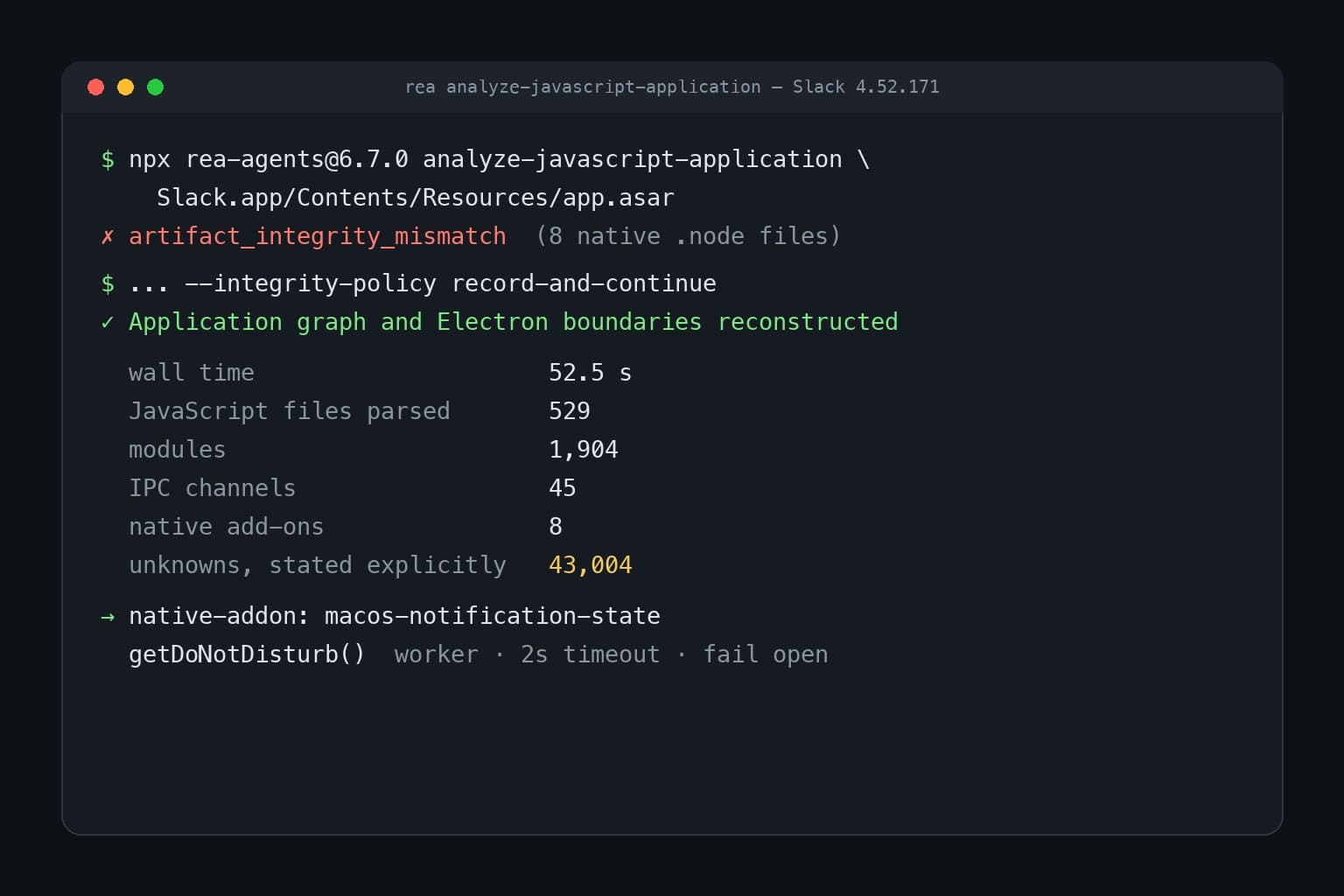
I skipped setup and ran the CLI directly against the app bundle (Slack 4.52.171 on macOS):
npx -y rea-agents@6.7.0 analyze-javascript-application \
  /Applications/Slack.app/Contents/Resources/app.asar --format json
It failed in under a second, which I kind of appreciated? The archive declares hashes for its files, and eight of Slack's native .node binaries didn't match their declared hashes. REA explained that packaging tools often re-sign native binaries after the archive is written, and told me to rerun with --integrity-policy record-and-continue if that was expected. Then it recorded those eight files as untrusted.
The second run took 52 seconds and produced a 158 MB JSON file:
| JavaScript files parsed | 529 |
| Modules | 1,904 |
| IPC channels found | 45 |
| Native add-ons | 8 |
| Things it explicitly marked as unknown | 43,004 |
That last number looks bad, but I actually think it's the most trustworthy thing in the output. Most of the IPC channel names came back as minified expressions like U.dZ.SLEEP_AND_WAKE, and REA says so plainly. It doesn't pretend to know.
The native add-ons were the interesting part. One of them is called macos-notification-state, and there's a tiny standalone script whose whole job is to call it. So my question became: how does Slack know when macOS Focus is silencing its notifications?
Here's roughly what's going on, in my own paraphrase of the minified code:
- Slack spins up a worker thread that loads the native add-on and calls
getDoNotDisturb(). My guess is it uses a separate thread so a slow call into macOS can't freeze the app. - If the worker hasn't answered in 2 seconds, Slack kills it and assumes you're *not* in Do Not Disturb. Errors also default to "not in DND".
- Results from that path are cached for 5 seconds, and the whole path sits behind a feature flag (
ASYNC_DND_CHECK), so presumably it's still being rolled out. - All of this feeds a function that builds a list of notification warnings: Do Not Disturb is on, macOS notification permission is denied or never granted, max notifications set to zero, a notification timeout under 250 ms, and a couple of failover states.
- That list is cached for an hour.
The one-hour cache made me laugh a little, because I can picture the incident behind it. Probably some version of this used to run too often and somebody said ok, once an hour is plenty.
Then I opened Slack's preferences (I let Claude drive Slack with computer use for this part) to see where those warnings actually show up. I couldn't find them. The notification settings are all there, but nothing about "hey, Focus is on." As far as I can tell, the desktop app only answers the question: the web app sends SLACK_GET_NOTIFICATION_WARNINGS over IPC, and whatever happens with the answer lives in the Slack client that loads from Slack's servers. That code was never on my disk, so REA couldn't see it.
So in about 10 minutes I learned something real and specific about how Slack works. And the part I didn't learn is where the actual product decisions live.
What I think actually changed
Honestly, I'm not sure "software is done" is the right takeaway, though I get why it went viral.
What changed for me is how much curiosity costs. In December I had to know to run strings, guess at what I was looking at, and spend an evening grepping. With REA I asked one question and got evidence back in under a minute, including a clear list of what it didn't know. That's a big drop in cost, and it's going to change who bothers to look. People who would never have opened Ghidra are going to open apps, and some of them (game preservation people, folks reviving bricked hardware, the person on r/bioinformatics wondering whether REA could stand in for an expensive Geneious subscription) are going to do pretty interesting things with it.
But I keep thinking about that one-hour cache. You can copy that behavior in an afternoon. What you can't really copy is why it's an hour, or which customer complaint made someone add the 2-second timeout. A lot of that lives server-side, or in someone's head, or in a postmortem doc. That's roughly what the more grounded replies on X were saying too: client-side behavior just got cheaper to understand, and distribution, data, trust and the boring work of maintaining something mostly didn't.
The 404 Media piece worries about AI-generated clones that "might slopify everything." I think that's a real risk, especially for hardware people put on their home network, and especially since the clone will have bugs its author can't diagnose. I'm not sure what to do about that except notice it.
Where the lines are (roughly)
I'm not a lawyer, and this isn't legal advice. Some things that seem clearly relevant, though:
- REA's own README says it's for lawful research, education, interoperability, preservation, and software you own or are authorized to examine. It explicitly doesn't support cracking or bypassing licenses.
- Plenty of EULAs and terms of service restrict reverse engineering, and the rules differ by country. Reading how a feature works is a different act from copying code or assets into your own product.
- What I did was static, read-only analysis of my own installed copy to answer one question. I didn't run anything against Slack's servers or copy any of their code, and the snippets above are my paraphrase.
- If you build a competing product, "the agent read the decompiled code" makes any clean-room argument pretty hard to defend. Worth thinking about before you start, not after.
If you're on the fence about trying it
A few things I'd tell a friend:
- Start with an Electron or JS app. The static analyzer needs no native engine and doesn't run the target, so it's the lowest-friction way to see what REA is like.
- Ask a narrow question. "How does X decide Y" worked great for me. "Clone this app" is the kind of prompt that makes the viral videos and probably disappoints in practice.
- Read the unknowns. The evidence-plus-limitations format is the best part of the tool. If your agent summarizes the findings and drops the unknowns, ask for them back.
- Look at what `setup` changes before you approve it. It edits your agent configs (with backups). I ran the CLI directly instead, and for a first look that was enough.
If I ended up doing this kind of digging regularly, I'd want each investigation to be a Linear issue that Cyrus picks up, so the evidence and the "here's what we couldn't see" list end up attached to the ticket instead of in a terminal I'll close. That's probably a separate post though.
Anyway, I went in expecting either magic or hype, and it turned out to be a pretty good flashlight. Mostly it made me want to look inside more things, and also made me a bit more aware of how much of any app was never on my computer to begin with.

Break free from the terminal
As your Claude Code powered Linear agent, Cyrus is capable of accomplishing whatever large or small issues you throw at it. Get PMs, designers and the CEO shipping product.