> ## Documentation Index
> Fetch the complete documentation index at: https://atcyrus.com/docs/llms.txt
> Use this file to discover all available pages before exploring further.
# GitHub
> How Cyrus integrates with GitHub — PR mentions, review triggers, and more
Cyrus connects to GitHub during onboarding and uses it to clone repos, create branches, and open pull requests. Beyond that, Cyrus can be **triggered directly from GitHub** through `@cyrusagent` mentions and PR review events.
***
## Setup
GitHub access is configured automatically during onboarding. It includes:
* **GitHub OAuth** — links your GitHub identity
* **GitHub App** — grants Cyrus access to selected repositories
* **Automatic token management** — tokens are refreshed behind the scenes
No manual configuration is needed after onboarding. To manage which repositories Cyrus can access, see [Managing Repos](/docs/managing-repos).
***
## @cyrusagent mentions on pull requests
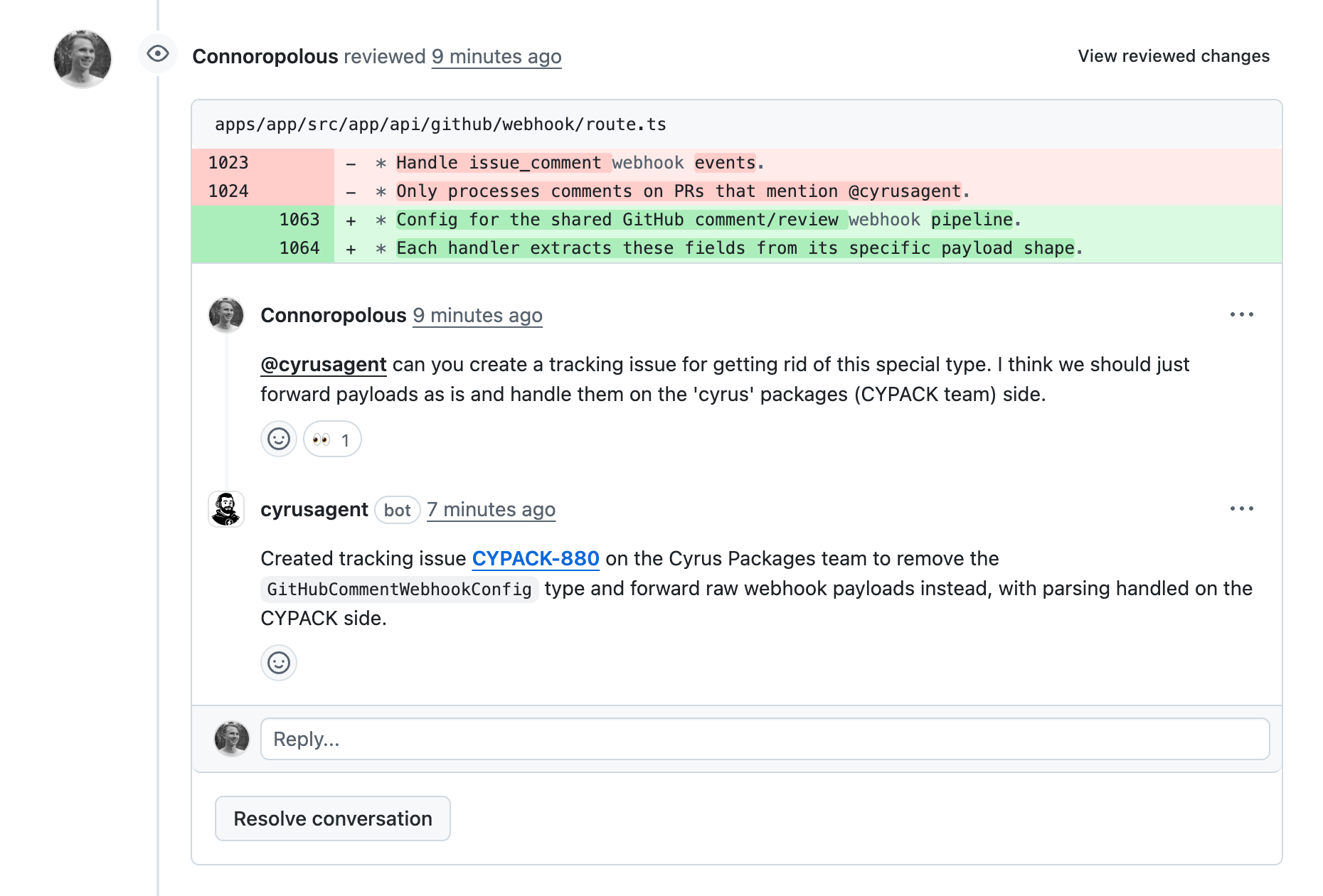
You can mention `@cyrusagent` in any PR comment — either an issue comment or a review comment — to trigger Cyrus directly from GitHub.
When Cyrus is mentioned, it will:
1. Validate the repository is connected and has an active subscription
2. Verify the commenter is authorized (organization member or repo owner)
3. Start a session to handle the request
4. Reply directly on the PR with its response
 ### Authorization
Mentions from users who are **not** organization members (or not owners on personal repos) are automatically rejected. Cyrus replies with an explanatory comment so the user understands why.
This prevents unauthorized users from triggering Cyrus on public repositories.
### What you can ask
Anything you'd normally ask Cyrus through Linear — create issues, investigate code, suggest fixes, and more. The context of the PR (files changed, review comments) is available to Cyrus during the session.
***
## PR review triggers
When a reviewer **requests changes** on a pull request created by Cyrus, the agent automatically picks up the review and starts addressing the feedback — no `@cyrusagent` mention required.
This works for:
* **Summary-level reviews** — general feedback left with "Request changes"
* **Line-level review comments** — specific feedback on individual lines of code
Cyrus will acknowledge the review and begin working on the requested changes, then push updated commits to the same PR.
***
## How it works
Under the hood, Cyrus uses GitHub webhooks to listen for events on your repositories:
| Event | Trigger |
| ----------------------------- | ------------------------------------------------- |
| `issue_comment` | A comment on a PR mentions `@cyrusagent` |
| `pull_request_review` | A reviewer requests changes on a Cyrus-created PR |
| `pull_request_review_comment` | A review comment on a PR mentions `@cyrusagent` |
Webhooks are configured automatically when you install the Cyrus GitHub App. No manual webhook setup is needed.
***
## Troubleshooting
**Cyrus doesn't respond to my mention**
* Verify the repository is connected in [Cyrus settings](https://app.atcyrus.com/repos)
* Confirm your team has an active subscription
* Check that you're a member of the GitHub organization (or owner of the repo)
**Cyrus doesn't pick up PR review feedback**
* This only works on PRs that Cyrus originally created
* The review must use "Request changes" — regular comments without a review verdict won't trigger it
**Webhook issues**
* Webhooks are managed by the Cyrus GitHub App installation
* If events stop working, double check the GitHub App is still installed. Go to [Integrations settings](https://app.atcyrus.com/settings/integrations) if not to start re-authing
***
Get support on Discord
### Authorization
Mentions from users who are **not** organization members (or not owners on personal repos) are automatically rejected. Cyrus replies with an explanatory comment so the user understands why.
This prevents unauthorized users from triggering Cyrus on public repositories.
### What you can ask
Anything you'd normally ask Cyrus through Linear — create issues, investigate code, suggest fixes, and more. The context of the PR (files changed, review comments) is available to Cyrus during the session.
***
## PR review triggers
When a reviewer **requests changes** on a pull request created by Cyrus, the agent automatically picks up the review and starts addressing the feedback — no `@cyrusagent` mention required.
This works for:
* **Summary-level reviews** — general feedback left with "Request changes"
* **Line-level review comments** — specific feedback on individual lines of code
Cyrus will acknowledge the review and begin working on the requested changes, then push updated commits to the same PR.
***
## How it works
Under the hood, Cyrus uses GitHub webhooks to listen for events on your repositories:
| Event | Trigger |
| ----------------------------- | ------------------------------------------------- |
| `issue_comment` | A comment on a PR mentions `@cyrusagent` |
| `pull_request_review` | A reviewer requests changes on a Cyrus-created PR |
| `pull_request_review_comment` | A review comment on a PR mentions `@cyrusagent` |
Webhooks are configured automatically when you install the Cyrus GitHub App. No manual webhook setup is needed.
***
## Troubleshooting
**Cyrus doesn't respond to my mention**
* Verify the repository is connected in [Cyrus settings](https://app.atcyrus.com/repos)
* Confirm your team has an active subscription
* Check that you're a member of the GitHub organization (or owner of the repo)
**Cyrus doesn't pick up PR review feedback**
* This only works on PRs that Cyrus originally created
* The review must use "Request changes" — regular comments without a review verdict won't trigger it
**Webhook issues**
* Webhooks are managed by the Cyrus GitHub App installation
* If events stop working, double check the GitHub App is still installed. Go to [Integrations settings](https://app.atcyrus.com/settings/integrations) if not to start re-authing
***
Get support on Discord